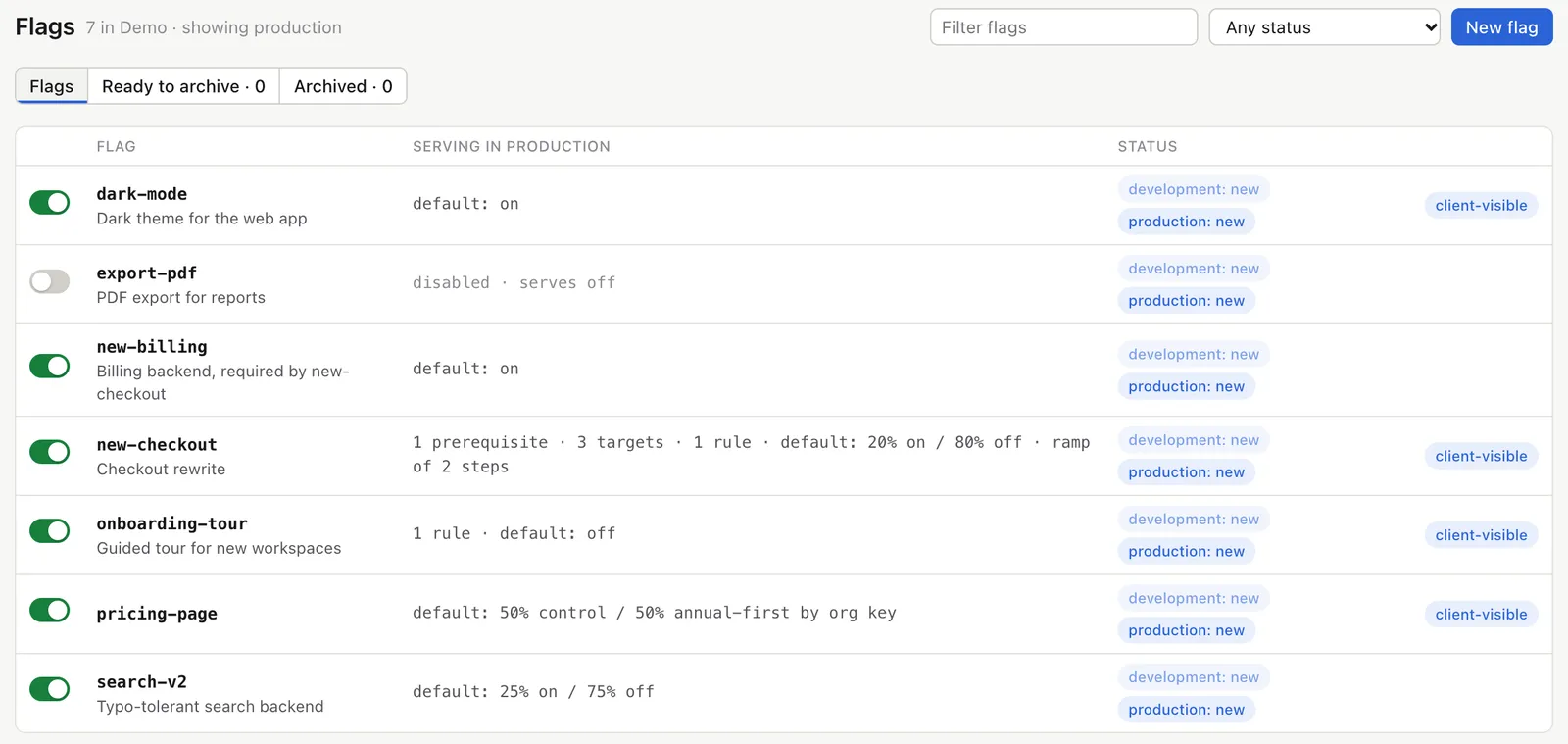
Turn features on for some users and off for others without a deploy. Changes reach your servers in about 5 seconds, and every plan has unlimited seats and flags.
If featflags has a problem, your apps keep serving the flags they already have. You can’t change a flag until we’re back, but production carries on as it was.
Your users stay yours
Your users’ names, emails and attributes never reach us, on any plan. SDKs report how often each variant was served, and in an experiment who saw which variant under IDs that only you can link back to a person.
Priced on usage, not people
Invite the whole company and create as many flags as you need. We don’t charge per monthly active user. Paid plans include a generous amount of traffic and a fair per-million rate above it.
An easy move from LaunchDarkly
Contexts, individual targets, prerequisites and segments work the way you know them. The importer keeps every user in the variant they had, and checks the result against LaunchDarkly’s own SDK.
Getting started
From sign-in to your first live flag
1
Sign in
Use Google or GitHub. You get an organisation on the Free plan and can invite your team straight away.
2
Add an SDK
Create a flag, copy a key and add a few lines to your app. The setup checks that your first evaluation arrived.
3
Change it live
Flip the flag or edit a rule in the dashboard. Your servers have the change in about 5 seconds.
The product
What’s in the dashboard
Targeting
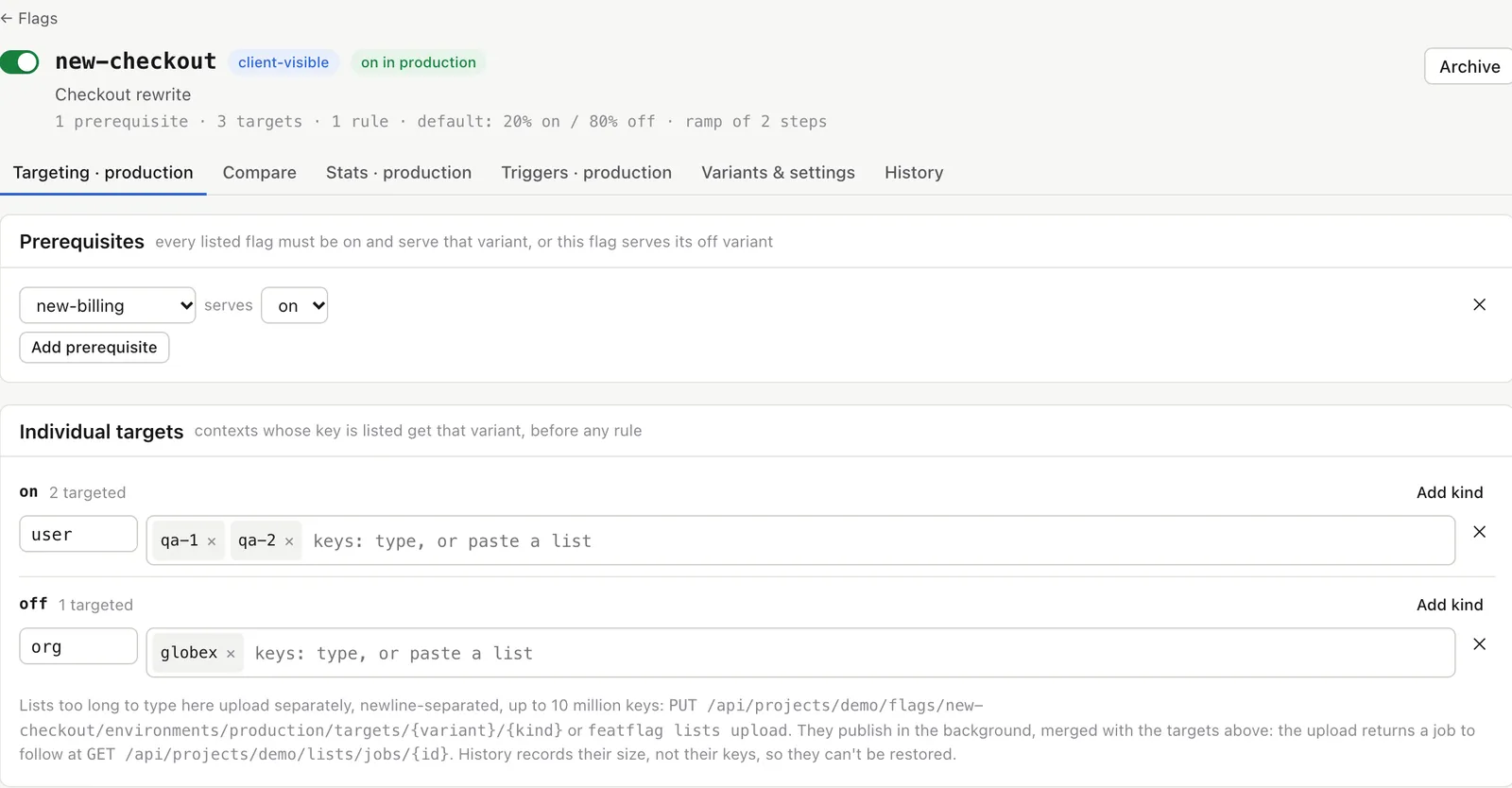
Target people, organisations and segments
Pick users or organisations by key, write rules on any attribute, make one flag depend on another, and reuse segments across flags. For entitlements and betas, upload a list of customer IDs, millions long if you need.
Contexts with kinds and multi-contexts
Regex, semver and date operators
Test any context before you publish
app.featflags.io
Rollouts
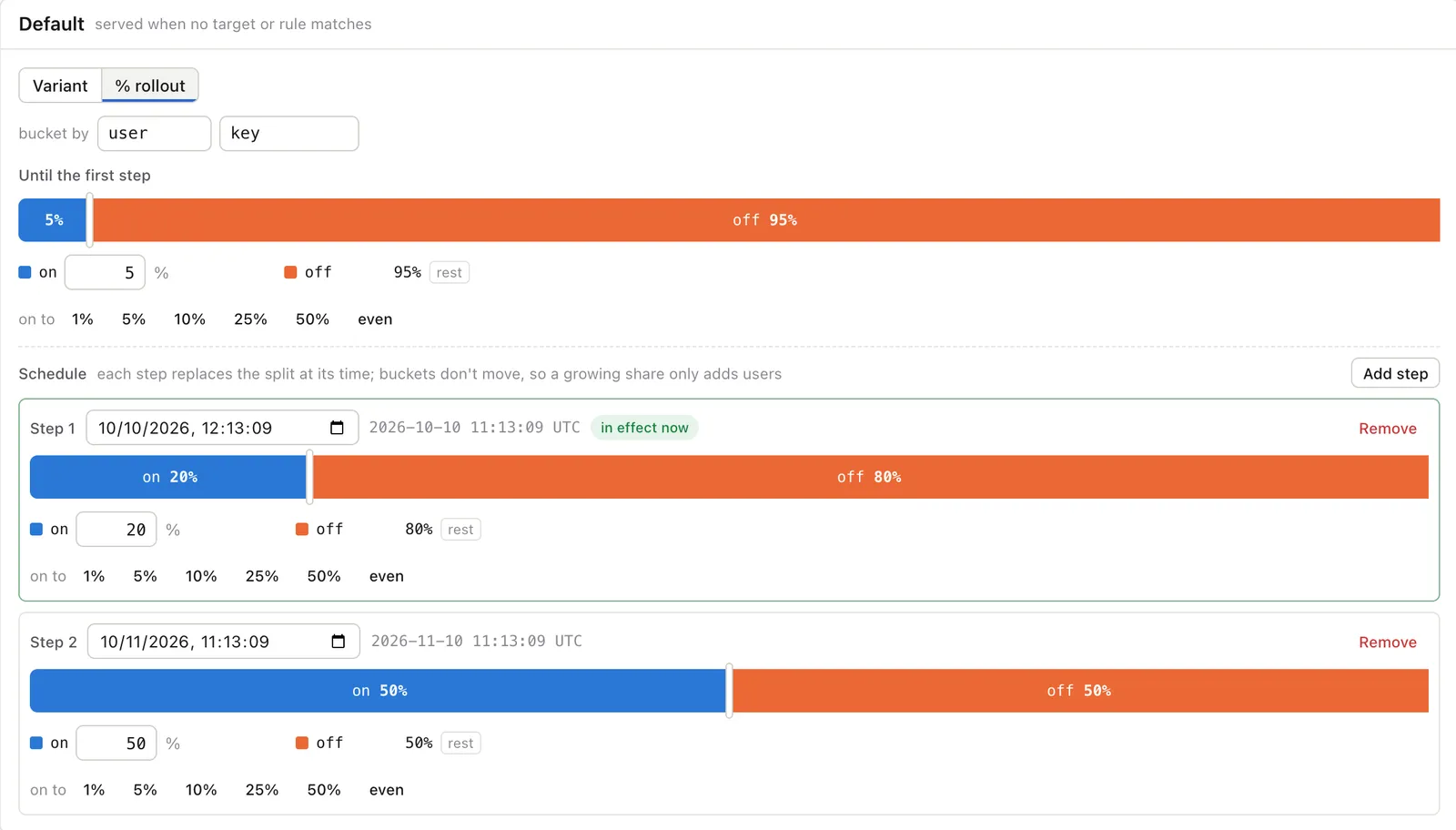
Percentage rollouts on a schedule
Split traffic by percentage and set dates for the next steps. People stay in their bucket, so going from 20% to 50% only adds users. On paid plans you can also require an approval in production or schedule a change for Monday morning.
Time-based ramps
Approvals and scheduled changes
Kill-switch URLs for your alerting
app.featflags.io
History
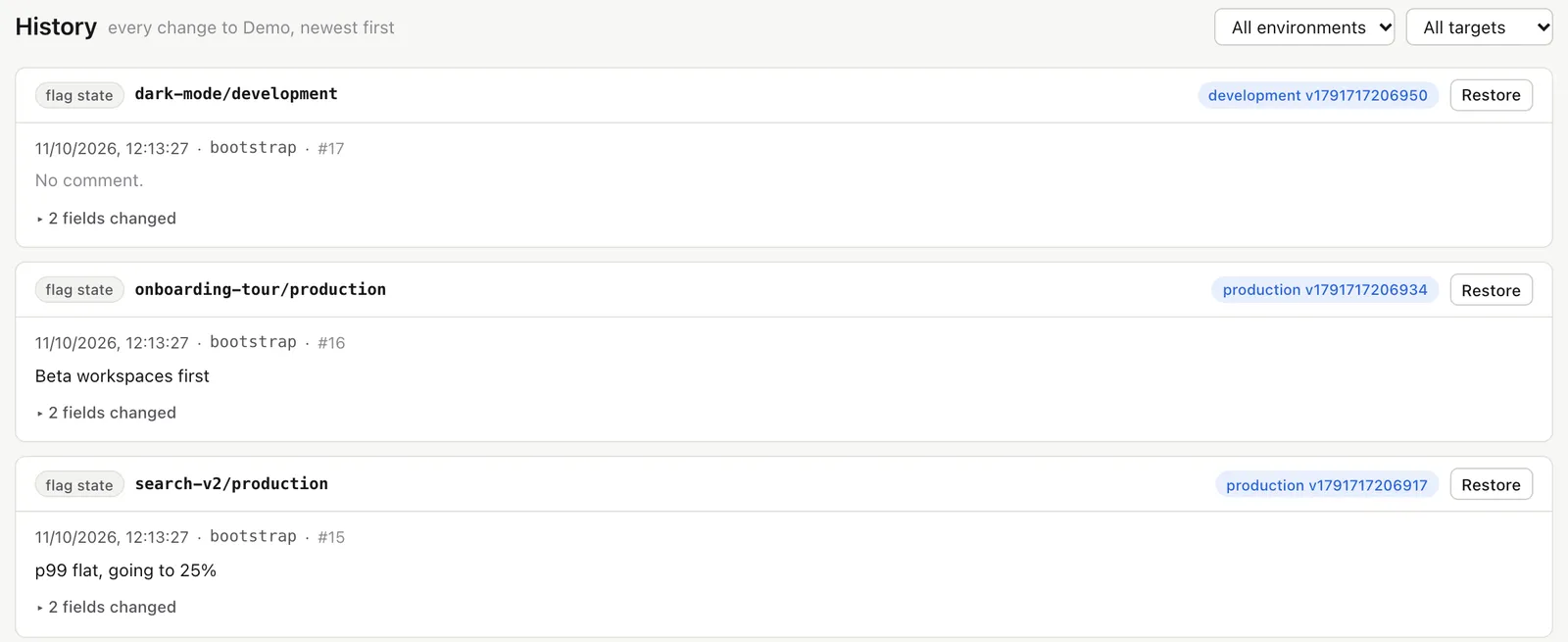
Who changed what, and why
Every change records its author, comment and a field-by-field diff, and you can restore any earlier version. Require comments in production and send changes to Slack or your own webhooks.
Restore with a preview
Webhooks and Slack
Roles per environment, scoped tokens
app.featflags.io
Beyond on and off
Test, roll out and hand over the busywork
All three are on every plan. Free runs one experiment at a time, Team 20 and Business as many as you like, with bandits.
off11.2%on11.9%Better · 99.8% chance to beat off
Experiments
Find out which variant wins
Run an A/B test on any flag and measure what matters to you, such as completed checkouts. Results are safe to read at any time, so looking early doesn’t fool you, and a bandit can move traffic to the winner while the test runs. Experiment data uses IDs that only you can link back to a person.
Bayesian or frequentist results
Guardrail metrics that call out harm
A warning when the split looks off
Staff
10%
50%
Everyonetomorrow 09:00
Release templates
Roll out every flag the same way
Write a rollout plan once, such as staff first, then 10%, 50% and everyone, and use it on any flag. Start each step yourself, or let the next one start on its own a day later. On Team and Business it can also watch your metrics and pause, or step back, when the new variant does harm. Every step goes through your approvals and shows in history.
Gradual and Staff first to start from
Steps that start on their own on Team and Business
Guardrail metrics that pause or roll back a release
Turn search-v2 off in productionWaiting for 2 reviewers
AI assistants
Let your AI assistant do the flag work
Connect Claude, Cursor or another AI assistant to featflags and ask it to create a flag, roll one out or find the ones ready to clean up. It acts as you, with your access or only read access, and its changes still need the comments and approvals yours do.
Any assistant that supports remote MCP servers
Sign in once, no keys to copy
Disconnect it from your account at any time
Compare
featflags next to the tools you’re weighing
Pricing, features and migration, side by side, with every claim linked to the vendor’s own docs.
Servers have a change within about 5 seconds. Browsers and mobile apps take up to a minute, or less when a tab or the app comes back into view. If you need every client updated in under a second, we’re not the right fit yet.
Browser and app flags are visible to your users
Only flags you mark client-visible reach a browser or mobile app, and anyone who inspects your app can read their rules. Keep sensitive targeting in server-only flags. Target keys are hashed, and private lists need a token your server issues.
Questions
Frequently asked questions
Something else? The docs cover every SDK and tool.
How fast does a change reach my users?
Servers have it within about 5 seconds. Browsers and mobile apps pick it up within a minute, or as soon as a tab or the app comes back into view.
Can people see my flags in the browser?
Only the flags you mark client-visible are available in browsers and mobile apps, and anyone who inspects your app can read their rules. Keep anything sensitive in server-only flags. Target keys are hashed, and private lists need a token your server issues, so nobody can list who’s on them.
What does it cost?
Prices aren’t published yet. Every plan will have unlimited seats and flags and no per-user pricing. Free has fixed limits; paid plans include a set amount of traffic each month and charge per million above it.
What do SDKs send you about my users?
Nothing about who they are. SDKs send us counts of which variant was served, never your users’ names, emails or other attributes. For a flag in an experiment they also send which variant each user saw and the events you track, under an ID made with a key that only you hold, so only you can link it back to a person. Those rows are deleted 30 days after the experiment ends.
Can an AI assistant break something?
It can only do what you can, or only read if you choose that when you connect it. Its changes are recorded as yours, need a comment where you require one and wait for reviewers where you require approval. It can’t manage members, tokens, SDK keys or billing.
Can I move from LaunchDarkly without changing who sees what?
Yes. featflags supports LaunchDarkly-compatible bucketing, so users keep their variants. The importer brings flags, targets, rules, segments and big segments across, and --verify checks the evaluations against LaunchDarkly’s own SDK.
Does it work with OpenFeature?
Yes. There are OpenFeature providers for Go, Python, Java, .NET, Ruby, PHP, Elixir, iOS, Android and Flutter, and every SDK supports the same hooks.
Create your first flag
Sign in with Google or GitHub. The Free plan doesn’t need a card.